Advanced Concrete Calculator: Estimate Volume, Bags & Total Cost

Concrete Calculator - Slabs, Walls, Columns, Stairs & Curbs

Material Density

Optional: You can enter wet concrete density to get a more accurate weight estimate. All other results like volume, bags, mix breakdown, and cost remain unchanged.

Concrete Slab Calculator

How to Use Concrete Slab Estimator

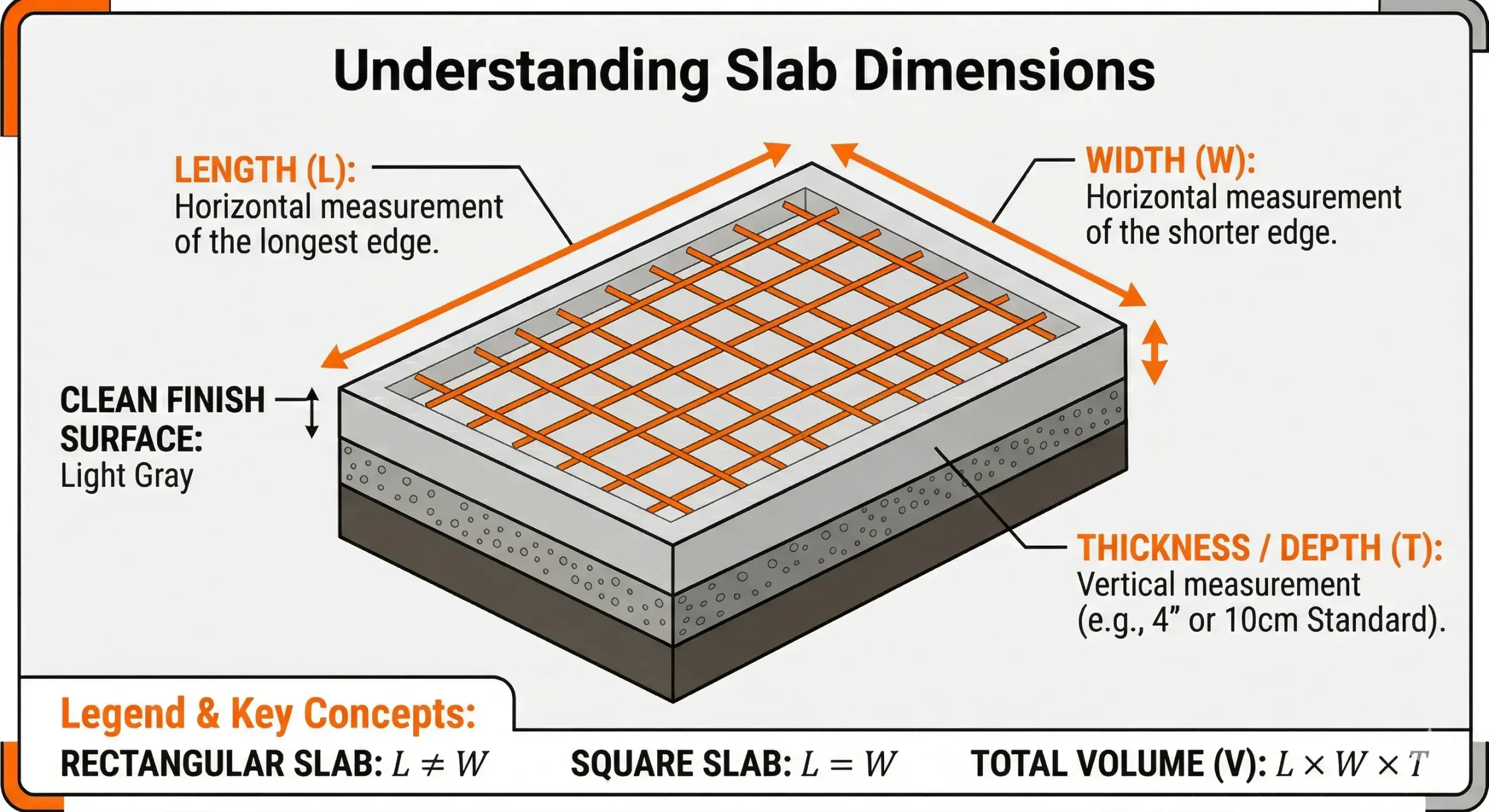
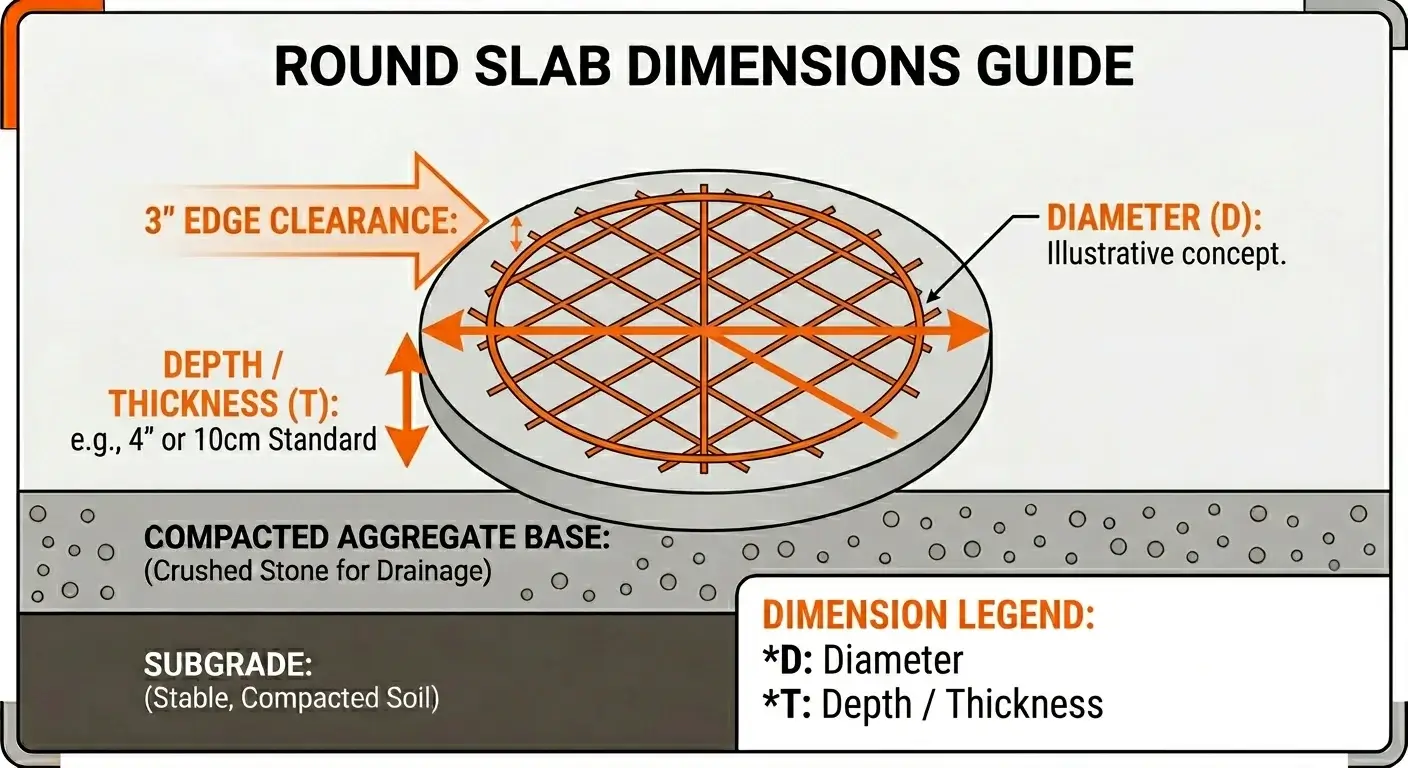
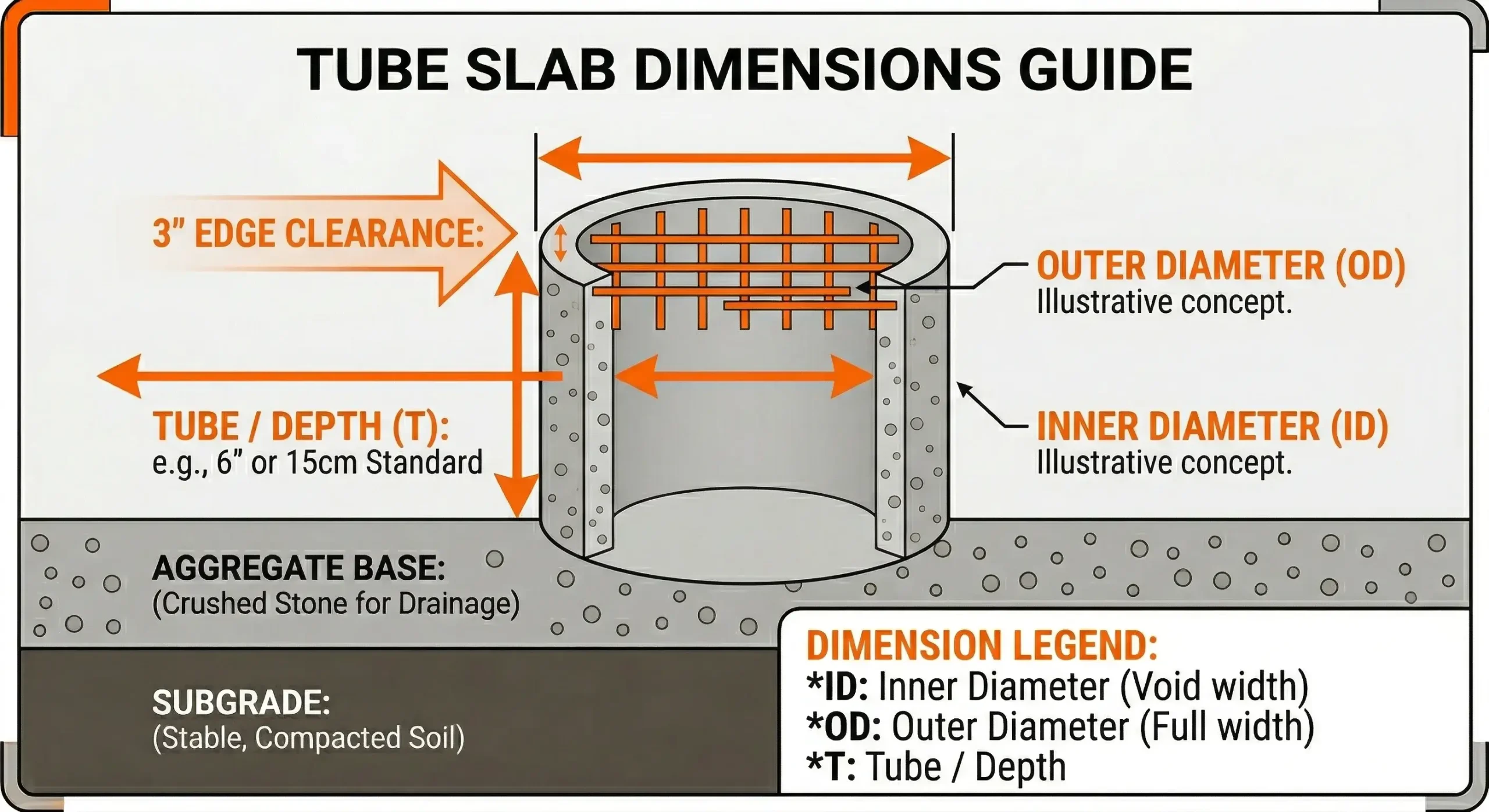
To use the concrete slab calculator, first select the slab shape: square/rectangular, tube, or round. Enter the slab dimensions, such as length, width, thickness, or diameter, and choose your unit like meters, feet, or yards. You can optionally select a concrete grade and add a wastage allowance of 3–8% to account for small losses.
If desired, enter the concrete price to see the total cost. Click calculate, and the concrete slab estimator will show the concrete volume in cubic meters, cubic feet, and cubic yards, weight in kilograms, tons, and pounds, the number of concrete bags needed, and the estimated amount of materials like cement, sand, gravel, and water.

Floor Slab Measurement Example

You want a rectangular floor slab 5 meters long, 4 meters wide, and 0.15 meters thick. Select square/rectangular, enter the dimensions, and add 5% wastage. After calculation, the tool shows the volume as 3.15 m³, the required weight, total concrete bags, estimated material amounts for cement, sand, gravel, and water, and the total cost if a price is entered. This gives a complete overview of everything you need before starting the project.

Square or rectangular slab diagram

Concrete Walls & Footings Calculator

How to Use Concrete Footing Calculator

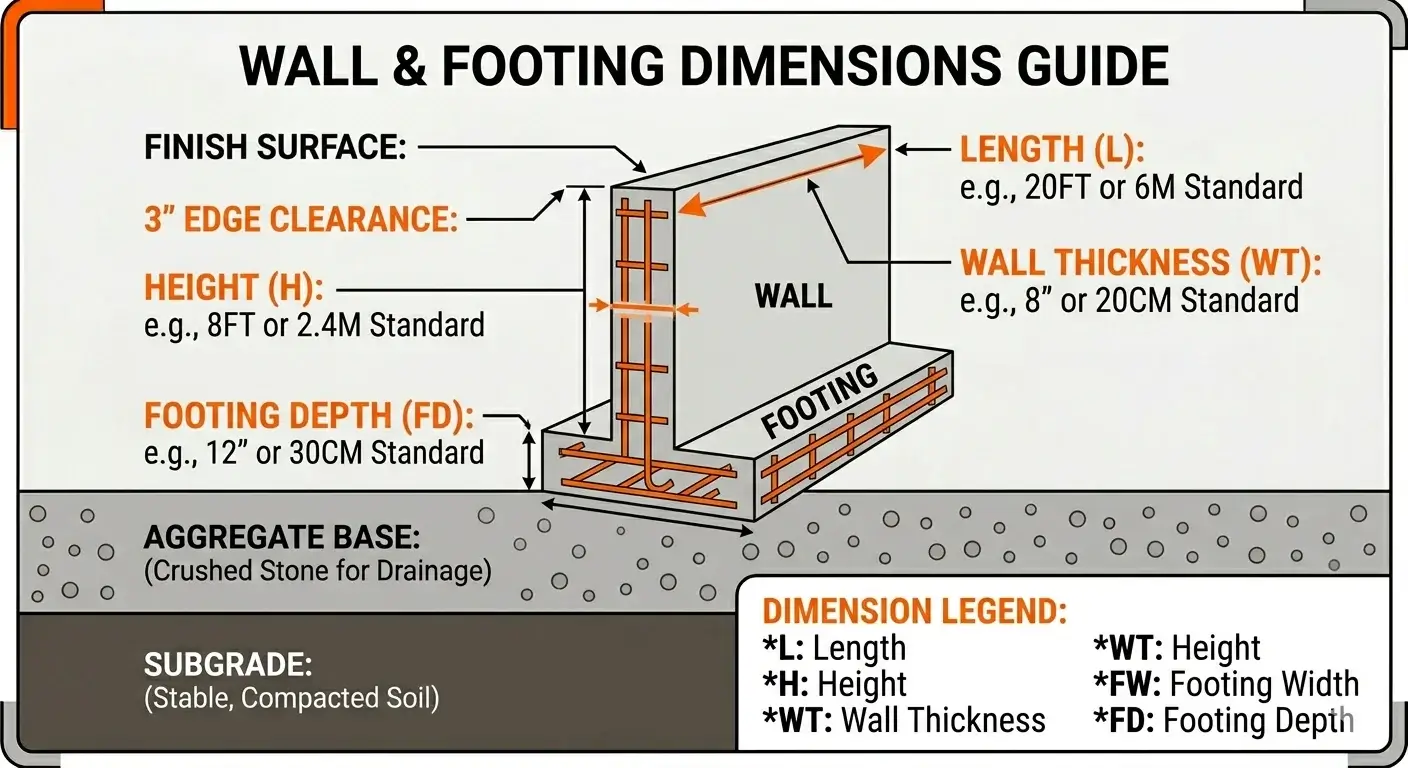
To use the wall and concrete footing calculator, start by selecting whether you are calculating for a wall or a footing. Enter the dimensions required for your structure: length, height, and thickness for a wall, or length, width, and depth for a footing, and choose your preferred unit like meters, feet, or yards. Optionally, select the concrete grade and add a wastage percentage between 3% and 8% to ensure enough material is available.
You can also provide the concrete price to estimate total cost. Click calculate, and the figuring concrete tool will display the concrete volume in cubic meters, cubic feet, and cubic yards, the weight in kilograms, tons, and pounds, the number of concrete bags required, and the estimated quantities of cement, sand, gravel, and water.

Footing Calculator Usage Example

You are building a footing 10 meters long, 0.6 meters wide, and 0.4 meters deep. Select footing, enter the dimensions, and include 5% wastage. After calculation, the tool shows the total concrete needed, the corresponding weight, required bags, material breakdown for cement, sand, gravel, and water, and the estimated cost. This helps you plan all materials efficiently before starting construction.

Wall dimensions diagram

Concrete Column & Hole Calculator

How to Use Concrete Column Calculator

To use the column and hole calculator, first choose the shape you need, such as a round column or a circular hole. Enter the measurements like height and diameter, and select your preferred unit: meters, feet, or yards. You can optionally select a concrete grade and add a wastage allowance of 3%-8% for extra safety. If you want, enter the concrete price to get the total cost.

Click calculate, and the tool will provide the concrete volume in cubic meters, cubic feet, and cubic yards, the weight in kilograms, tons, and pounds, the number of concrete bags required, and estimated amounts of cement, sand, gravel, and water.

Example of Using the Hole Calculator

You need to fill 20 round columns, each 3 meters tall with a diameter of 0.3 meters. Select a round column, enter the height and diameter, and add 5% wastage. After calculation, the tool shows the concrete volume for one column, total volume for 20 columns, the corresponding weight, number of bags, material breakdown for cement, sand, gravel, and water, and total cost. This ensures you know exactly how much material is needed for all columns or circular holes before starting the project.

Round column diagram

Concrete Stairs Calculator

How to Concrete Steps Calculator

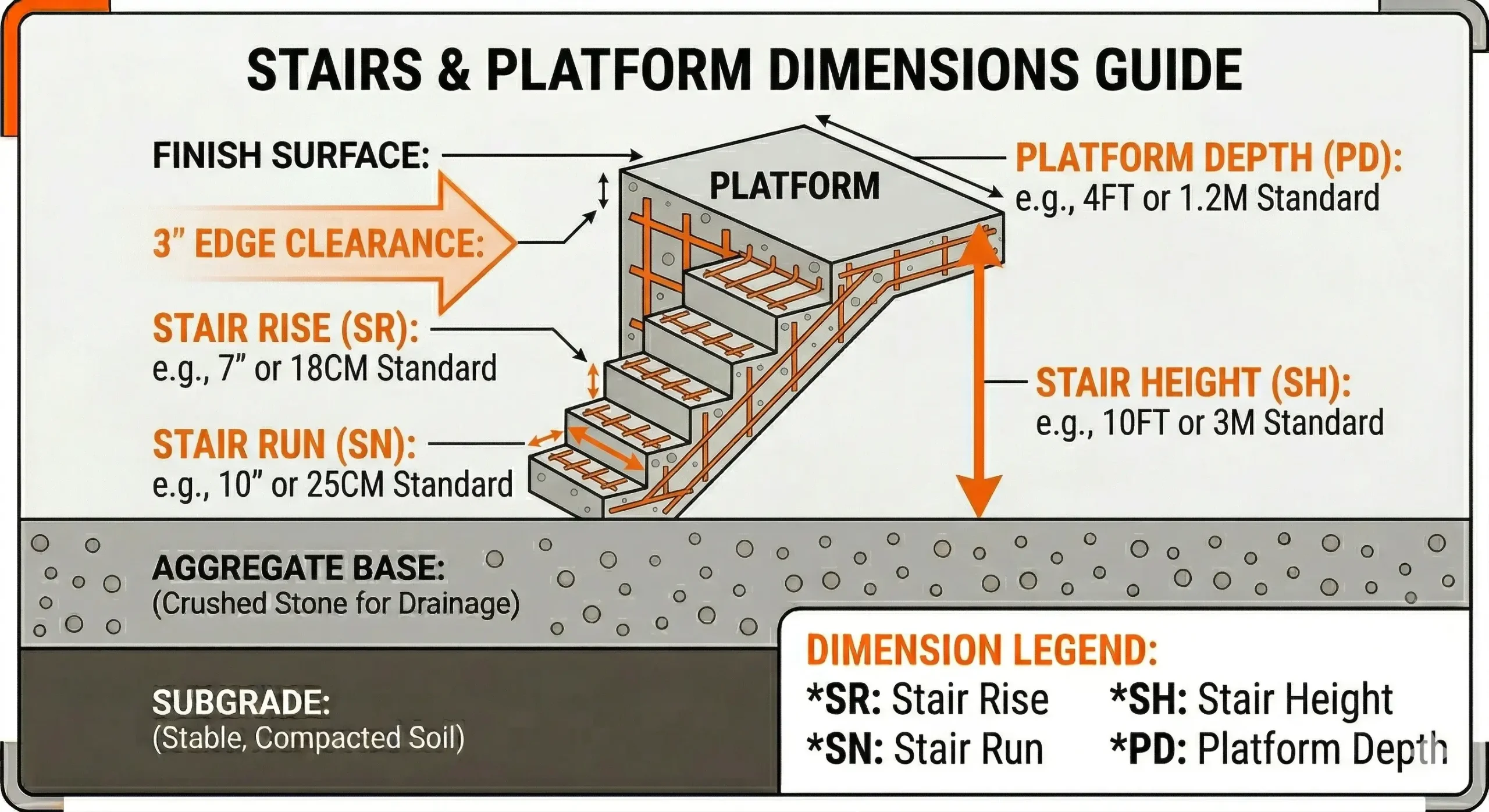
The concrete stairs calculator helps you determine exactly how much material is needed for staircases of any shape. Start by entering the total width, height, and depth of the stairs, along with the number of steps, and select your preferred unit such as meters, feet, or yards. You can optionally choose a concrete grade and add a wastage allowance of 3–8% to cover minor losses during pouring.

If you want, enter the concrete price to get an estimated cost. Click calculate, and the tool will display the concrete volume in cubic meters, cubic feet, and cubic yards, the weight in kilograms, tons, and pounds, required concrete bags, and the estimated amounts of cement, sand, gravel, and water.

Stairs Calculator Usage Example

You are building a staircase 4 meters wide, 3 meters high, and 0.2 meters deep with 15 steps. Enter the dimensions, number of steps, and a 5% wastage allowance. After calculation, the tool provides the total concrete volume for the stairs, weight, number of bags, material breakdown for cement, sand, gravel, and water, and total cost. This allows you to plan and order materials accurately before starting the stair construction.

Stairs dimensions diagram

Concrete Curbs & Gutter Barrier Calculator

How to Use Concrete Curb Calculator

The concrete curbs and gutters calculator helps you quickly determine how much material is needed for road edges, sidewalks, or drainage channels. Enter the total length, width, and height (or depth) of the curb or gutter and select your preferred unit, such as meters, feet, or yards. Optionally, you can choose a concrete grade and add a wastage allowance between 3–8% to account for small losses during pouring.

If desired, enter the concrete price to calculate the total cost. Click calculate, and the tool shows the concrete volume in cubic meters, cubic feet, and cubic yards, the weight in kilograms, tons, and pounds, required concrete bags, and estimated amounts of cement, sand, gravel, and water.

Gutter Calculator Usage Example

You are building a gutter 50 meters long, 0.3 meters wide, and 0.2 meters deep. Enter these dimensions and add a 5% wastage allowance. After calculation, the tool provides the total concrete volume, weight, number of bags, material breakdown for cement, sand, gravel, and water, and total cost. This ensures accurate material planning before starting the curb or gutter project.

Curb dimensions diagram

Concrete Cost Calculator

To estimate the cost of concrete, you first need to calculate the total volume required, which can be done easily using the concrete calculator. After that, choose your country and enter the local prices of cement, sand, aggregate, and water into the provided fields. Once all values are added, click the Calculate Cost button. The tool will instantly provide an estimate of the total material cost required for your concrete mix.


Material Prices (Required)

Cement price
Sand price
Aggregate price
Water price

Use This Tool on Your Website for Free

Add this calculator to WordPress or any website with a responsive iframe snippet.

'); }function exportText(containerId) { const el = document.getElementById(containerId); const data = el.dataset.resultData ? JSON.parse(el.dataset.resultData) : null; if (!data) return; const txt = `${data.calcName} - Concrete Calculator Results\n${'='.repeat(50)}\nVolume: ${formatNum(data.volWithWaste)} ft³ (${formatNum(data.volYd3)} yd³)\nWeight: ${formatNum(data.weightLb)} lb (${formatNum(data.weightTons)} tons)\nBags: 40lb: ${data.bags[40]}, 60lb: ${data.bags[60]}, 80lb: ${data.bags[80]}\n${data.cost ? `Total Cost: $${formatNum(data.cost)} USD\n` : ''}`; const a = document.createElement('a'); a.href = 'data:text/plain;charset=utf-8,' + encodeURIComponent(txt); a.download = 'concrete-results.txt'; a.click(); }function exportPDF(containerId) { window.print(); }// Tab switching document.querySelectorAll('.tab-btn').forEach(btn => { btn.addEventListener('click', () => { document.querySelectorAll('.tab-btn').forEach(b => b.classList.remove('active')); document.querySelectorAll('.tab-content').forEach(c => c.classList.remove('active')); btn.classList.add('active'); document.getElementById(btn.dataset.tab).classList.add('active'); }); });// Slabs shape selector + diagram and Width-required logic let slabsShape = 'rectangle'; const slabsWidthGroup = document.getElementById('slabs-width-group'); const slabsWidthInput = document.getElementById('slabs-width'); const slabsWidthLabel = document.getElementById('slabs-width-label'); const slabsLengthLabel = document.getElementById('slabs-length-label'); const slabsThicknessLabel = document.getElementById('slabs-thickness-label'); const slabsRebarSection = document.getElementById('slabs-rebar-section');function updateSlabsDiagram() { const diagramRect = document.getElementById('slabs-diagram-rectangle'); const diagramRound = document.getElementById('slabs-diagram-round'); const diagramTube = document.getElementById('slabs-diagram-tube'); if (!diagramRect || !diagramRound || !diagramTube) return; diagramRect.classList.toggle('hidden', slabsShape !== 'rectangle'); diagramRound.classList.toggle('hidden', slabsShape !== 'round'); diagramTube.classList.toggle('hidden', slabsShape !== 'tube'); }function updateSlabsLabelsAndRequirements() { if (slabsShape === 'rectangle') { slabsLengthLabel.innerHTML = ' Length'; slabsWidthLabel.innerHTML = ' Width'; slabsThicknessLabel.innerHTML = ' Thickness'; slabsWidthGroup.classList.remove('hidden'); slabsWidthInput.required = true; if (slabsRebarSection) slabsRebarSection.classList.remove('hidden'); } else if (slabsShape === 'round') { slabsLengthLabel.innerHTML = ' Diameter'; slabsThicknessLabel.innerHTML = ' Depth (Thickness)'; slabsWidthGroup.classList.add('hidden'); slabsWidthInput.required = false; if (slabsRebarSection) slabsRebarSection.classList.add('hidden'); } else if (slabsShape === 'tube') { slabsLengthLabel.innerHTML = ' Outer Diameter'; slabsWidthLabel.innerHTML = ' Inner Diameter'; slabsThicknessLabel.innerHTML = ' Depth (Height)'; slabsWidthGroup.classList.remove('hidden'); slabsWidthInput.required = true; if (slabsRebarSection) slabsRebarSection.classList.add('hidden'); } }document.querySelectorAll('#slabs .shape-option').forEach(opt => { opt.addEventListener('click', () => { document.querySelectorAll('#slabs .shape-option').forEach(o => o.classList.remove('selected')); opt.classList.add('selected'); slabsShape = opt.dataset.shape; updateSlabsLabelsAndRequirements(); updateSlabsDiagram(); }); }); updateSlabsLabelsAndRequirements(); updateSlabsDiagram();// Slabs form (correct square, round and tube logic) document.getElementById('slabs-form').addEventListener('submit', e => { e.preventDefault(); const len = toFeet(parseFloat(document.getElementById('slabs-length').value) || 0, document.getElementById('slabs-length-unit').value); const w = toFeet(parseFloat(document.getElementById('slabs-width').value) || 0, document.getElementById('slabs-width-unit').value); const thick = toFeet(parseFloat(document.getElementById('slabs-thickness').value) || 0, document.getElementById('slabs-thickness-unit').value); const qty = parseInt(document.getElementById('slabs-qty').value) || 1;let volFt3 = 0; if (slabsShape === 'rectangle') { volFt3 = len * w * thick * qty; } else if (slabsShape === 'round') { const d = len; const depth = thick; volFt3 = Math.PI * (d / 2) ** 2 * depth * qty; } else if (slabsShape === 'tube') { const outerD = len; const innerD = w; const depth = thick; const outerR = outerD / 2; const innerR = innerD / 2; volFt3 = Math.PI * (outerR * outerR - innerR * innerR) * depth * qty; }let rebarEstimate = null; if (slabsShape === 'rectangle') { const spVal = parseFloat(document.getElementById('slabs-rebar-spacing').value) || 0; const spUnit = document.getElementById('slabs-rebar-spacing-unit').value; const spacingFt = spUnit === 'in' ? spVal / 12 : toFeet(spVal, 'cm'); const lbPerFt = parseFloat(document.getElementById('slabs-rebar-size').value) || 0.668; rebarEstimate = computeRebarGridEstimate({ lengthFt: len, widthFt: w, spacingFt, lbPerFt, slabQty: qty }); }renderResults('slabs-results', { volFt3, wastage: parseFloat(document.getElementById('slabs-wastage').value) || 0, price: parseFloat(document.getElementById('slabs-price').value) || 0, priceUnit: document.getElementById('slabs-price-unit').value, calcName: 'Concrete Slabs', grade: document.getElementById('slabs-grade').value || null, rebarEstimate }); });// Walls form document.getElementById('walls-form').addEventListener('submit', e => { e.preventDefault(); const len = toFeet(parseFloat(document.getElementById('walls-length').value) || 0, document.getElementById('walls-length-unit').value); const h = toFeet(parseFloat(document.getElementById('walls-height').value) || 0, document.getElementById('walls-height-unit').value); const thick = toFeet(parseFloat(document.getElementById('walls-thickness').value) || 0, document.getElementById('walls-thickness-unit').value); const qty = parseInt(document.getElementById('walls-qty').value) || 1; const volFt3 = len * h * thick * qty; renderResults('walls-results', { volFt3, wastage: parseFloat(document.getElementById('walls-wastage').value) || 0, price: parseFloat(document.getElementById('walls-price').value) || 0, priceUnit: document.getElementById('walls-price-unit').value, calcName: 'Concrete Walls & Footings', grade: document.getElementById('walls-grade').value || null }); });// Column sub-tabs switching document.querySelectorAll('#columns-subtabs .subtab-btn').forEach(btn => { btn.addEventListener('click', () => { document.querySelectorAll('#columns-subtabs .subtab-btn').forEach(b => b.classList.remove('active')); document.querySelectorAll('#columns .subtab-content').forEach(c => c.classList.remove('active')); document.getElementById('columns-diagram-round').classList.add('hidden'); document.getElementById('columns-diagram-square').classList.add('hidden');btn.classList.add('active'); const targetId = btn.dataset.subtab; document.getElementById(targetId).classList.add('active'); if (targetId === 'columns-round') { document.getElementById('columns-diagram-round').classList.remove('hidden'); } else { document.getElementById('columns-diagram-square').classList.remove('hidden'); } }); });// Columns - Round Column form document.getElementById('columns-round-form').addEventListener('submit', e => { e.preventDefault(); const d = toFeet(parseFloat(document.getElementById('columns-round-diameter').value) || 0, document.getElementById('columns-round-diameter-unit').value); const h = toFeet(parseFloat(document.getElementById('columns-round-height').value) || 0, document.getElementById('columns-round-height-unit').value); const qty = parseInt(document.getElementById('columns-round-qty').value) || 1; const volFt3 = Math.PI * (d / 2) ** 2 * h * qty; renderResults('columns-round-results', { volFt3, wastage: parseFloat(document.getElementById('columns-round-wastage').value) || 0, price: parseFloat(document.getElementById('columns-round-price').value) || 0, priceUnit: document.getElementById('columns-round-price-unit').value, calcName: 'Round Concrete Columns', grade: document.getElementById('columns-round-grade').value || null }); });// Columns - Square Column form document.getElementById('columns-square-form').addEventListener('submit', e => { e.preventDefault(); const side = toFeet(parseFloat(document.getElementById('columns-square-side').value) || 0, document.getElementById('columns-square-side-unit').value); const width = toFeet(parseFloat(document.getElementById('columns-square-width').value) || 0, document.getElementById('columns-square-width-unit').value); const h = toFeet(parseFloat(document.getElementById('columns-square-height').value) || 0, document.getElementById('columns-square-height-unit').value); const qty = parseInt(document.getElementById('columns-square-qty').value) || 1; const volFt3 = side * width * h * qty; renderResults('columns-square-results', { volFt3, wastage: parseFloat(document.getElementById('columns-square-wastage').value) || 0, price: parseFloat(document.getElementById('columns-square-price').value) || 0, priceUnit: document.getElementById('columns-square-price-unit').value, calcName: 'Square Concrete Columns', grade: document.getElementById('columns-square-grade').value || null }); });// Stairs form – standard triangular flight + rectangular platform document.getElementById('stairs-form').addEventListener('submit', e => { e.preventDefault(); const risePerStep = toFeet(parseFloat(document.getElementById('stairs-rise').value) || 0, document.getElementById('stairs-rise-unit').value); const runPerStep = toFeet(parseFloat(document.getElementById('stairs-run').value) || 0, document.getElementById('stairs-run-unit').value); const width = toFeet(parseFloat(document.getElementById('stairs-width').value) || 0, document.getElementById('stairs-width-unit').value); const platform = toFeet(parseFloat(document.getElementById('stairs-platform').value) || 0, document.getElementById('stairs-platform-unit').value); const steps = parseInt(document.getElementById('stairs-steps').value) || 1; const qty = parseInt(document.getElementById('stairs-qty').value) || 1;const totalRise = risePerStep * steps; const totalRun = runPerStep * steps;// Flight as right triangular prism: 0.5 * totalRise * totalRun * width const flightVol = 0.5 * totalRise * totalRun * width; // Platform as rectangular slab: platform depth * width * totalRise (approximate thickness) const platformVol = platform * width * totalRise;const volFt3 = (flightVol + platformVol) * qty;renderResults('stairs-results', { volFt3, wastage: parseFloat(document.getElementById('stairs-wastage').value) || 0, price: parseFloat(document.getElementById('stairs-price').value) || 0, priceUnit: document.getElementById('stairs-price-unit').value, calcName: 'Concrete Stairs', grade: document.getElementById('stairs-grade').value || null }); });// Curbs form – curb block + flag slab document.getElementById('curbs-form').addEventListener('submit', e => { e.preventDefault(); const h = toFeet(parseFloat(document.getElementById('curbs-height').value) || 0, document.getElementById('curbs-height-unit').value); const w = toFeet(parseFloat(document.getElementById('curbs-width').value) || 0, document.getElementById('curbs-width-unit').value); const d = toFeet(parseFloat(document.getElementById('curbs-depth').value) || 0, document.getElementById('curbs-depth-unit').value); const flag = toFeet(parseFloat(document.getElementById('curbs-flag').value) || 0, document.getElementById('curbs-flag-unit').value); const len = toFeet(parseFloat(document.getElementById('curbs-length').value) || 0, document.getElementById('curbs-length-unit').value); const qty = parseInt(document.getElementById('curbs-qty').value) || 1;const curbVol = len * h * d; // vertical curb block const flagVol = len * flag * w; // horizontal flag/slabconst volFt3 = (curbVol + flagVol) * qty;renderResults('curbs-results', { volFt3, wastage: parseFloat(document.getElementById('curbs-wastage').value) || 0, price: parseFloat(document.getElementById('curbs-price').value) || 0, priceUnit: document.getElementById('curbs-price-unit').value, calcName: 'Concrete Curbs & Gutters', grade: document.getElementById('curbs-grade').value || null }); });// Grade info modal const gradeModalWrapper = document.getElementById('grade-modal-wrapper'); const gradeModalBody = document.getElementById('grade-modal-body'); const gradeModalClose = document.getElementById('grade-modal-close'); const gradeModalBackdrop = document.getElementById('grade-modal-backdrop');function openGradeModal(selectId) { const select = document.getElementById(selectId); if (!select) return; const grade = select.value; if (!grade || !GRADE_DATA[grade]) { gradeModalBody.innerHTML = '

Please select a concrete grade from the dropdown first to view detailed information.

'; } else { const g = GRADE_DATA[grade]; gradeModalBody.innerHTML = `

Grade ${grade} concrete:

  • Strength: ${g.strength}
  • Mix Ratio: ${g.mixRatio} (Cement : Sand : Aggregate)
  • Water–Cement Ratio: ${g.waterCement}
  • Cement Content: ${g.cementContent}
  • Typical Uses: ${g.suitable}
`; } gradeModalWrapper.classList.remove('hidden'); }gradeModalClose.addEventListener('click', () => { gradeModalWrapper.classList.add('hidden'); });gradeModalBackdrop.addEventListener('click', e => { if (e.target === gradeModalBackdrop) { gradeModalWrapper.classList.add('hidden'); } });document.querySelectorAll('.grade-info-trigger').forEach(btn => { btn.addEventListener('click', () => { const selectId = btn.dataset.gradeSelect; openGradeModal(selectId); }); });// Cost Calculator form – grade only changes mix if selected, prices all required document.getElementById('cost-form').addEventListener('submit', e => { e.preventDefault();const volumeUnit = document.getElementById('cost-volume-unit').value; const volume = parseFloat(document.getElementById('cost-volume').value) || 0; const grade = document.getElementById('cost-grade').value || null;let volFt3 = 0; if (volumeUnit === 'yd') volFt3 = volume * 27; else if (volumeUnit === 'm') volFt3 = volume * 35.3147; else if (volumeUnit === 'ft') volFt3 = volume;const materials = calcMaterials(volFt3, grade, 0);const cementPrice = parseFloat(document.getElementById('cost-cement').value) || 0; const cementUnit = document.getElementById('cost-cement-unit').value; const sandPrice = parseFloat(document.getElementById('cost-sand').value) || 0; const sandUnit = document.getElementById('cost-sand-unit').value; const gravelPrice = parseFloat(document.getElementById('cost-gravel').value) || 0; const gravelUnit = document.getElementById('cost-gravel-unit').value; const waterPrice = parseFloat(document.getElementById('cost-water').value) || 0; const waterUnit = document.getElementById('cost-water-unit').value;let cementCost = 0; if (cementUnit === 'kg') cementCost = materials.cement.kg * cementPrice; else if (cementUnit === 'lb') cementCost = materials.cement.lb * cementPrice;let sandCost = 0; if (sandUnit === 'yd') sandCost = materials.sand.yd3 * sandPrice; else if (sandUnit === 'm') sandCost = materials.sand.m3 * sandPrice; else if (sandUnit === 'ft') sandCost = (materials.sand.yd3 * 27) * sandPrice;let gravelCost = 0; if (gravelUnit === 'yd') gravelCost = materials.aggregate.yd3 * gravelPrice; else if (gravelUnit === 'm') gravelCost = materials.aggregate.m3 * gravelPrice; else if (gravelUnit === 'ft') gravelCost = (materials.aggregate.yd3 * 27) * gravelPrice;let waterCost = 0; if (waterUnit === 'gal') waterCost = materials.water.gallons * waterPrice; else if (waterUnit === 'L') waterCost = materials.water.liters * waterPrice;const totalCost = cementCost + sandCost + gravelCost + waterCost;const costHtml = `

Cost Breakdown

Total Project Cost
$${formatNum(totalCost)} USD
Cement Cost
$${formatNum(cementCost)}
Sand Cost
$${formatNum(sandCost)}
Aggregate Cost
$${formatNum(gravelCost)}
Water Cost
$${formatNum(waterCost)}

Material Quantities

Cement
${formatNum(materials.cement.lb)} lb (${formatNum(materials.cement.kg)} kg)
40lb: ${materials.cement.bags40} | 60lb: ${materials.cement.bags60} | 80lb: ${materials.cement.bags80}
Sand
${formatNum(materials.sand.yd3)} yd³ (${formatNum(materials.sand.m3)} m³)
Aggregate
${formatNum(materials.aggregate.yd3)} yd³ (${formatNum(materials.aggregate.m3)} m³)
Water
${formatNum(materials.water.gallons)} gal (${formatNum(materials.water.liters)} L)
${buildExtendedAnalysisHtml({ volM3WithWaste: toCubicMeters(volFt3), materials, rebarEstimate: null })}
`;const el = document.getElementById('cost-results'); el.innerHTML = costHtml; el.classList.add('visible'); el.dataset.resultData = JSON.stringify({ calcName: 'Concrete Cost Calculator', volFt3, volWithWaste: volFt3, volM3WithWaste: toCubicMeters(volFt3), materials, rebarEstimate: null }); });document.getElementById('extended-material-density')?.addEventListener('change', refreshExtendedAnalysisPanels);// Reset buttons document.querySelectorAll('[data-reset]').forEach(btn => { btn.addEventListener('click', () => { const tab = btn.dataset.reset; if (tab === 'columns-round') { const form = document.getElementById('columns-round-form'); form.reset(); document.getElementById('columns-round-qty').value = 1; const res = document.getElementById('columns-round-results'); res.innerHTML = ''; res.classList.remove('visible'); } else if (tab === 'columns-square') { const form = document.getElementById('columns-square-form'); form.reset(); document.getElementById('columns-square-qty').value = 1; const res = document.getElementById('columns-square-results'); res.innerHTML = ''; res.classList.remove('visible'); } else { const form = document.getElementById(tab + '-form'); if (form) { form.reset(); if (document.getElementById(tab + '-qty')) document.getElementById(tab + '-qty').value = 1; if (tab === 'slabs') { document.getElementById('slabs-width').value = ''; slabsShape = 'rectangle'; document.querySelectorAll('#slabs .shape-option').forEach(o => o.classList.remove('selected')); document.querySelector('#slabs .shape-option[data-shape="rectangle"]').classList.add('selected'); updateSlabsLabelsAndRequirements(); updateSlabsDiagram(); } const res = document.getElementById(tab + '-results'); if (res) { res.innerHTML = ''; res.classList.remove('visible'); delete res.dataset.resultData; } if (tab === 'cost') { const costRes = document.getElementById('cost-results'); costRes.innerHTML = ''; costRes.classList.remove('visible'); delete costRes.dataset.resultData; } } } }); });// Select1 Script document.querySelectorAll(".input-row select").forEach(select => {const row = select.closest(".input-row");select.addEventListener("mousedown", () => { row.classList.add("open"); });select.addEventListener("blur", () => { row.classList.remove("open"); });select.addEventListener("change", () => { row.classList.remove("open"); });});// Select2 Script document.querySelectorAll(".select-wrap select").forEach(select => {const wrap = select.closest(".select-wrap");select.addEventListener("mousedown", () => { wrap.classList.add("open"); });select.addEventListener("blur", () => { wrap.classList.remove("open"); });select.addEventListener("change", () => { wrap.classList.remove("open"); });});// Embed tool modal and code generation const embedModalWrapper = document.getElementById('embed-modal-wrapper'); const embedModalBackdrop = document.getElementById('embed-modal-backdrop'); const openEmbedModalBtn = document.getElementById('open-embed-modal'); const embedModalCloseBtn = document.getElementById('embed-modal-close'); const embedCodeOutput = document.getElementById('embed-code-output'); const copyEmbedCodeBtn = document.getElementById('copy-embed-code-btn'); const embedCopyStatus = document.getElementById('embed-copy-status');const fallbackEmbedUrl = 'https://your-domain.com/concrete-calculator';const getEmbedSourceUrl = () => { const currentUrl = window.location.href; if (!currentUrl || !/^https?:\/\//i.test(currentUrl)) return fallbackEmbedUrl; return currentUrl; };const buildResponsiveEmbedCode = () => { const src = getEmbedSourceUrl(); return `
`; };const openEmbedModal = () => { embedCodeOutput.value = buildResponsiveEmbedCode(); embedCopyStatus.textContent = ''; embedModalWrapper.classList.remove('hidden'); };const closeEmbedModal = () => { embedModalWrapper.classList.add('hidden'); };if (openEmbedModalBtn) { openEmbedModalBtn.addEventListener('click', openEmbedModal); }if (embedModalCloseBtn) { embedModalCloseBtn.addEventListener('click', closeEmbedModal); }if (embedModalBackdrop) { embedModalBackdrop.addEventListener('click', event => { if (event.target === embedModalBackdrop) closeEmbedModal(); }); }document.addEventListener('keydown', event => { if (event.key === 'Escape' && embedModalWrapper && !embedModalWrapper.classList.contains('hidden')) { closeEmbedModal(); } });if (copyEmbedCodeBtn) { copyEmbedCodeBtn.addEventListener('click', async () => { try { await navigator.clipboard.writeText(embedCodeOutput.value); embedCopyStatus.textContent = 'Embed code copied successfully.'; } catch (error) { embedCodeOutput.select(); document.execCommand('copy'); embedCopyStatus.textContent = 'Embed code copied successfully.'; } }); }

What is a Concrete Calculator

A concrete calculator is an online tool that helps you quickly figure out how much concrete you need for any construction project. Instead of manually calculating volumes, weights, and material requirements, this tool does it automatically based on the dimensions you enter. You can input measurements for slabs, walls, footings, columns, stairs, curbs, or gutters and select your preferred unit, like meters or feet. 

It can also estimate the number of concrete bags, weight, and quantities of materials like cement, sand, gravel, and water. This calculator even allows you to include wastage and calculate the total cost. Using a concrete calculator saves time, reduces errors, and helps you plan materials and budget accurately before starting a project.

How to Use a Concrete Calculator

Using a concrete calculator is simple, but getting accurate results depends on choosing the right inputs.

First, identify the shape of the structure you want to calculate, such as a slab, footing, column, or stairs. Once you know the shape, select the appropriate calculator from the options above that matches your project.

Next, enter the required dimensions, such as length, width, depth, or diameter, depending on the selected shape. Make sure your measurements are accurate and choose the correct unit (meters, feet, or yards) to avoid errors.

After entering the details, click the calculate button to instantly get results, including concrete volume, weight, material breakdown, and required bags.

To make things easier, we’ve also included a usage guide and examples for each calculator type, so you can understand exactly how to use the tool for different projects.

Additionally, some calculators include optional settings to improve accuracy and save time. These may include features like wastage allowance, concrete grade selection, or density inputs, so it’s recommended to review these options before calculating.

Why Use a Concrete Estimator

A concrete estimator is a smart tool designed to help builders, contractors, and DIY enthusiasts quickly determine how much concrete is needed for any project. It eliminates guesswork, reduces material waste, ensures accurate budgeting, and helps avoid costly mistakes that can lead to delays. 

By entering the dimensions of your structure, selecting units, and adding optional inputs like concrete grade or wastage, the calculator provides exact estimates for volume, weight, concrete bags, and even material breakdowns, including cement, sand, gravel, and water.

Concrete is one of the most widely used construction materials due to its strength and versatility, but it can crack if not properly reinforced in areas with heavy stress or tension. That’s why planning the right amount of concrete in advance is crucial for durability, safety, and cost-efficiency.

Common Uses of Concrete Calculator

CategoryProjectsExamples
Residential & OutdoorPatios, sidewalks, driveways, slabs on gradeGarage, basement, shed, hot-tub pads
Stairs, steps, rampsFence posts, deck posts, pergola posts (using sonotubes)
Raised beds, planters, benches–
Foundations & StructuralFootings (isolated pads, strip footings, pier pads)Stem walls, poured foundation walls
Grade beams, monolithic slabsSquare or round columns
Commercial, Site & UtilityWarehouse or shop slabs, machine pads, equipment padsDock aprons, loading ramps, drainage channels
Light-pole bases, sign bases, bollardsRetaining walls
Curbs and guttersCast-in-place walls

Recommended Concrete Thickness Guide

Planning a concrete project starts with knowing the right thickness for your structure. Using the recommended thickness helps ensure strength, durability, and safety, while also reducing waste and unnecessary cost. The guide below provides typical thicknesses for common residential, commercial, and outdoor concrete projects. Always check local building codes and structural requirements before finalizing your plans.

Project TypeTypical ThicknessNotes
Sidewalk or walkway4 in (100 mm)Often reinforced lightly with wire mesh or fibers; a compacted base is recommended
Patio or terrace4 in (100 mm)Use well-compacted base; increase to 5 in (125 mm) for heavy grills, fire pits, or furniture
Driveway (passenger cars)4–5 in (100–125 mm)Increase to 5–6 in (125–150 mm) for trucks, SUVs, or heavy traffic
Garage slab4–5 in (100–125 mm)Thicken edges or use turned-down perimeter as specified; reinforcement recommended
Hot-tub or spa pad6 in (150 mm)Check load with manufacturer; add reinforcement as specified
Shed or small outbuilding pad4 in (100 mm)Consider thickened edges or pier supports for heavier structures
Stairs or steps (treads)3–4 in (75–100 mm)Volume depends on total run × width × riser count; ensure proper slope and support
Footings (strip, continuous)8–12 in (200–300 mm)Width and depth depend on soil, load, and building code; always confirm local requirements
Columns and posts6–12 in (150–300 mm)Size depends on height, load, and reinforcement; check structural design
Curbs and gutters6–8 in (150–200 mm)Thickness varies with traffic load; ensure proper compaction and slope

Concrete Volume Formulas for Common Shapes

To calculate how much concrete you need, choose the shape that matches your project and use the correct formula. All formulas below assume measurements are taken in feet.

Square or Rectangular Slab

A slab with length, width, and thickness.

Concrete Volume Formula:

Volume (ft³) = Length × Width × Depth

Convert units:

  • Volume (yd³) = ft³ ÷ 27
  • Volume (m³) = ft³ × 0.0283

Round Slab

A circular slab with a diameter and depth.

Step 1: Find the area of the circle
Area (ft²) = π × (Diameter ÷ 2)²

Step 2: Find the volume
Volume (ft³) = Area × Depth

Convert units:

  • Volume (yd³) = ft³ ÷ 27
  • Volume (m³) = ft³ × 0.0283

π (Pi) = 3.14

Concrete Wall

A wall with thickness, length, and height.

Concrete Volume Formula:

Volume (ft³) = Thickness × Length × Height

Convert units:

  • Volume (yd³) = ft³ ÷ 27
  • Volume (m³) = ft³ × 0.0283

Concrete Footing (Footer)

A footing with width, length, and depth.

Concrete Volume Formula:

Volume (ft³) = Width × Length × Depth

Convert units:

  • Volume (yd³) = ft³ ÷ 27
  • Volume (m³) = ft³ × 0.0283

Square Column

A column with width, length, and height.

Concrete Volume Formula:

Volume (ft³) = Width × Length × Height

Convert units:

  • Volume (yd³) = ft³ ÷ 27
  • Volume (m³) = ft³ × 0.0283

Round Column

A circular column with a diameter and height.

Step 1: Find the area of the circle
Area (ft²) = π × (Diameter ÷ 2)²

Step 2: Find the volume
Volume (ft³) = Area × Height

Convert units:

  • Volume (yd³) = ft³ ÷ 27
  • Volume (m³) = ft³ × 0.0283

π (Pi) = 3.14

Concrete Steps (Stairs)

Steps with platform depth, rise height, run depth, and width.

Important:
Count all steps, including the top platform. Each step and the platform are calculated as separate sections.

Step 1: Volume below the platform

Volume (ft³) = Platform Depth × (Rise Height × Number of Steps) × Width

Step 2: Volume below each step

Volume (ft³) = Run Depth × (Rise Height × Step Number) × Width

(Add volumes for Step 1, Step 2, Step 3, etc.)

Step 3: Total concrete volume

Total Volume (ft³) = Platform Volume + Step Volumes

Convert units:

  • Volume (yd³) = ft³ ÷ 27
  • Volume (m³) = ft³ × 0.0283

Curbs and Gutters

With curb depth, curb height, flag thickness, gutter width, and length.

Calculate the curb and gutter as two separate sections.

Volume below the curb

Volume (ft³) = Curb Depth × (Curb Height + Flag Thickness) × Length

Volume below the gutter

Volume (ft³) = Gutter Width × Flag Thickness × Length

Total concrete volume

Volume (ft³) = Curb Volume + Gutter Volume

Convert units:

  • Volume (yd³) = ft³ ÷ 27
  • Volume (m³) = ft³ × 0.0283

Cost Calculator

Along with volume estimation, we also provide a cost calculator to help you estimate the total cost of concrete for your project.

This feature works with all shapes and allows you to quickly calculate expenses based on your input. Simply enter the required details, including the price of materials (such as cement, sand, and aggregate) or the cost per unit of concrete.

Once added, the calculator will instantly show the estimated total cost based on your location or pricing inputs.

This helps you plan your budget more effectively and avoid unexpected expenses before starting your project.

Understanding Project’s Carbon Footprint (CO₂)

When you see “Estimated CO₂ from Cement” in your results, you’re not just looking at a number; you’re seeing the environmental cost of your project.

Concrete is the most widely used building material in the world. But behind its strength and durability, there’s a hidden impact. Cement, the key ingredient that binds everything together, accounts for around 8% of global CO₂ emissions. That’s more than the entire aviation industry.

So when your calculator shows a CO₂ value, it’s helping you understand something most people overlook:
the environmental footprint of every slab, wall, or foundation you build.

A infographic on the concrete Eco-Impact: The CO2

What Is “Embodied Carbon”?

The CO₂ value shown in your results represents what’s known as embodied carbon.

This isn’t about emissions from trucks or construction equipment. Instead, it refers to the carbon released during the production of materials, especially cement.

Two major processes are responsible for this:

  • Calcination – a chemical reaction where limestone is heated and releases CO₂
  • High-temperature kilns – cement production requires temperatures above 1,450°C (2,640°F), which consumes massive amounts of energy

In simple terms, before your concrete is even poured, a significant amount of carbon has already been released into the atmosphere.

Why Focus on Cement?

You might wonder what about sand, gravel, or water?

While those materials do have a small environmental impact (mostly from transportation), they are not the main contributors.
Around 90% of concrete’s total carbon footprint comes from cement alone.

That’s why this calculator focuses specifically on cement-related CO₂.
It gives you the most accurate and meaningful insight into your project’s true environmental impact.

Making It Real: What Do These Numbers Mean?

Let’s be honest, seeing something like “952 kg of CO₂” doesn’t mean much at first glance.

To make it easier to understand, we convert that number into something relatable:
  Passenger car travel distance

How it works:

  • A typical car today emits about 0.4 kg of CO₂ per mile

What it means:

If your result shows 2,381 miles, that’s roughly the same carbon impact as driving a car across half a continent.

This comparison helps you move from abstract numbers to real-world understanding, making it easier to evaluate your project’s impact.

Who Should Use This Feature?

This isn’t just a “nice-to-have” feature; it’s genuinely useful depending on who you are:

 Eco-Conscious Homeowners

If you care about sustainability, this data helps you make smarter decisions. For example, you might choose to replace part of your cement with greener alternatives like fly ash or slag, which can reduce emissions by up to 40%.

 Contractors & Builders

Including CO₂ estimates in your proposals shows clients that you’re thinking beyond just cost and materials. It builds trust and gives you a real competitive edge, especially as sustainability becomes more important.

Architects & Engineers

This provides a quick, early-stage estimate for green building certifications like LEED or local compliance standards, saving time during planning and approvals.

How to Reduce Your Project’s CO₂ Footprint

If your results seem higher than expected, don’t worry, there are practical ways to reduce your impact:

1. Use the Right Concrete Grade

Avoid over-engineering. If a 25 MPa mix is enough, don’t use 40 MPa.
Higher-strength mixes require more cement, which directly increases CO₂ emissions.

2. Use Supplementary Cementitious Materials (SCMs)

Ask your supplier about materials like fly ash or slag.
These are often recycled industrial byproducts that can replace a portion of cement, significantly lowering emissions without compromising performance.

3. Calculate Accurately

Over-ordering concrete doesn’t just waste money; it wastes carbon.

Using a precise calculator ensures you order only what you need, avoiding unnecessary environmental impact.

Why This Matters More Than Ever

Construction is evolving. It’s no longer just about building strong structures; it’s about building responsibly.

By understanding your project’s carbon footprint, you’re not just completing a calculation.
You’re making an informed decision about cost, performance, and environmental impact all at once.

And that’s what separates a basic project from a smarter one.

Material Density (Optional Weight Estimate)

This feature helps you understand how heavy your concrete will be, based on the type of material you choose. While your main results like volume, bag counts, mix breakdown, and cost remain the same, this option gives you an extended weight estimate for better planning.

What’s the Purpose?

Not all concrete weighs the same. By selecting a material density, you’re telling the calculator how heavy your mix is, which directly affects the total weight output. This is especially useful when you need to plan transportation, check load limits, or ensure your formwork can handle the pressure.

How It Works

The calculator multiplies your total concrete volume by the selected density:

  • Standard (~2400 kg/m³) → Regular construction use
  • Lightweight (~1750 kg/m³) → Reduced load applications
  • Heavy / Stone (~2500+ kg/m³) → High-mass, heavy-duty projects

Based on your selection, it instantly shows:

  • Total weight (kg)
  • Weight in tonnes
  • Weight in pounds

It also provides a transport tip, estimating how many pickup loads your concrete might require. This gives you a quick, real-world reference instead of just raw numbers.

Who Should Use It?

  • DIY users & homeowners → To plan material handling and avoid overloading vehicles
  • Contractors & builders → To estimate transport needs and job-site logistics
  • Engineers & planners → To consider load impact on structures or formwork

Why It’s Useful

This feature turns your estimate into something practical and actionable. Instead of just knowing how much concrete you need, you’ll know:

  • Whether your truck can carry it
  • If multiple trips are required
  • How heavy the load will be on your structure

In short, it helps you avoid surprises, reduce risk, and make smarter decisions before you even start the job.

Reinforced Slab (Rebar) — What This Feature Does

This feature allows you to accurately estimate the amount of steel reinforcement (rebar) required for rectangular concrete slabs. While concrete is strong in compression, it can crack under tension. Rebar acts as internal support, improving durability and preventing structural failure.

What’s the Purpose?

The goal of this feature is to give you a practical estimate of rebar quantity and weight based on your slab size and spacing inputs. It’s especially useful for planning materials, budgeting, and understanding how much reinforcement your slab may require before construction begins.

How It Works

The calculator creates a grid layout of rebar across your slab using the spacing you provide (in inches or centimeters). From there, it calculates:

  • Total rebar length (in feet and meters)
  • Total rebar weight (in lbs and kg)

To make the estimate more realistic, it automatically includes:

  • 3-inch edge clearance → Keeps rebar slightly inside the slab to protect it from moisture and corrosion
  • 15% extra length for lap splices → Accounts for overlaps where rebar pieces are joined, as well as minor cutting waste

You can also select the rebar size (ASTM standard), which determines the weight per foot. Larger bars are heavier and typically used for higher load conditions.

Who Should Use It?

  • DIY builders & homeowners → For patios, driveways, and small slabs
  • Contractors → For quick on-site material estimates

Why It’s Useful

Instead of guessing or over-ordering, this feature helps you:

  • Estimate how much steel you’ll need
  • Understand the weight of reinforcement
  • Plan material purchases more accurately

It saves time, reduces waste, and gives you a more realistic picture of your project requirements.

Important Note

This is an estimation tool, not a full structural design. For load-bearing or critical structures, an engineering review is always recommended.

Concrete Planning & Estimation Tips

Before ordering concrete, take time to review your measurements and project conditions. Small mistakes can lead to material shortages or costly overages.

• Complex layouts: Divide unusual shapes into simple sections like rectangles or circles, calculate each part separately, then combine the totals
• Uneven or sloped surfaces: Use an average depth by adding the minimum and maximum thickness and dividing by two
• Extra allowance: Include 5–10% additional volume to cover waste, spillage, and minor ground variations
• Same unit system: Measure everything using one system (either metric or US units) to prevent conversion errors
• Structural needs: Reinforcement such as rebar, mesh, or fibers does not change volume, but it greatly affects strength; always follow engineering or code requirements
• Base preparation: Poorly compacted soil can increase real concrete usage, so proper base work improves accuracy
• Weather timing: Hot or windy conditions can increase loss and finishing time, which may require a slight extra material

An infographic on concrete strength and usage roadmap

Quick Access to This Concrete Calculator

Tired of searching for this concrete calculator every time you need it? The easiest way to fix that is to save it once and keep it ready for future use. On a computer, you can bookmark this page so it opens with a single click just press Ctrl + D on Windows or Cmd + D on Mac and confirm the save. If you’re using a phone, open the browser menu and choose “Add to Home Screen.” This creates an icon on your phone, just like an app, so you can launch the calculator anytime without opening a browser or typing the website address. This simple step keeps your concrete estimates fast, easy, and always within reach.

FAQs: All about Figuring Concrete

What is the standard thickness of concrete?

There is no single “standard” thickness for all concrete projects because the required depth depends on how the concrete will be used and how much load it must carry. For light-use areas like walkways and patios, concrete is usually poured about 4 inches thick. 

Driveways that support cars are often 4 to 5 inches, while slabs for garages, hot tubs, or heavy equipment are commonly 5 to 6 inches or more. Footings and foundations are thicker because they carry structural loads, and their size is based on soil conditions and local building codes. 

The key rule is that thicker concrete provides more strength and durability, but it should always match the project’s purpose and code requirements rather than using a one-size-fits-all depth.

What’s the difference between an online concrete calculator and a physical construction calculator?

An online concrete calculator is designed to make estimating fast and simple. You enter your dimensions, select the shape, and it instantly gives you the concrete volume, bag count, and sometimes material breakdown and cost. It reduces math errors, supports multiple units, and is easy to use on a phone or computer at the job site.

A physical construction calculator, however, depends on manually inputting formulas and handling conversions by hand. It can be reliable for basic math, but it depends heavily on the user’s knowledge and careful data entry. 

The main difference is convenience and accuracy: online concrete estimator automate the formulas and reduce mistakes, while physical calculators rely on manual calculations and experience. For most users, an online tool is faster, easier, and more practical for everyday estimating.

How to figure out the yards of concrete needed? How to calculate cubic yards of concrete?

To calculate how many yards of concrete you need, you first measure the length, width, and thickness of the area in feet. Multiply those three numbers to get cubic feet. Since concrete is usually ordered in cubic yards, divide the result by 27 (because 27 cubic feet = 1 cubic yard).

For example, if a slab is 10 feet long, 10 feet wide, and 0.33 feet thick (4 inches), the volume is 33 cubic feet. Divide by 27, and you get about 1.22 cubic yards. It’s smart to add 5–10% extra for waste or uneven ground.

How to figure out cement (bags and materials)?

Once you know the total concrete volume, you can estimate how much cement and other materials are needed. For bagged concrete, manufacturers usually state how much volume one bag produces (for example, an 80-lb bag makes about 0.6 cubic feet). Divide your total cubic feet by that amount to get the number of bags.

For raw materials, concrete is made from cement, sand, gravel, and water. The exact amounts depend on the mix ratio (such as 1:2:3), but volume is still the starting point. That’s why calculating volume first is the most important step before estimating cement or materials.

What is the Formula for figuring concrete?

All concrete calculations are based on simple volume formulas:

For rectangular shapes:
Volume = Length × Width × Depth

For round shapes:
Volume = π × (Diameter ÷ 2)² × Depth

After finding cubic feet:
Cubic yards = Cubic feet ÷ 27
Cubic meters = Cubic feet × 0.0283

These formulas work for slabs, footings, columns, and walls when you match them to the correct shape.

How do you figure out concrete for a slab?

To calculate concrete for a slab, measure the slab’s length and width, then convert the thickness into feet (4 inches = 0.33 ft, 6 inches = 0.5 ft). Multiply all three values to get cubic feet. Convert that number into cubic yards if ordering ready-mix.

For example, a 12 ft × 10 ft slab that is 4 inches thick uses about 1.48 cubic yards of concrete. Add extra if the ground is uneven or the edges are thicker.

How to calculate concrete for any project?

To calculate concrete for any project, follow these three steps:
First, identify the shape (slab, wall, column, footing, or round form).
Second, measure all required dimensions using the same unit system.
Third, apply the correct volume formula and convert the result into the unit you need (yards, meters, or bags).

This method works for patios, driveways, foundations, posts, stairs, and curbs. The key is accuracy in measurements and choosing the correct shape formula.

How do I calculate yards of concrete / How to calculate cubic yards of concrete?

To calculate cubic yards of concrete, you first need the volume in cubic feet. Measure the length, width, and thickness of the area in feet and multiply them together. This gives you cubic feet. Then divide that number by 27, because one cubic yard equals 27 cubic feet.

For example, a slab that is 12 feet long, 10 feet wide, and 4 inches thick (0.33 feet) needs about 39.6 cubic feet of concrete. Dividing by 27 gives about 1.47 cubic yards. It’s best to add 5–10% extra to allow for waste and uneven ground.

How to calculate concrete square footage?

Square footage is used to find the surface area before you calculate volume. Multiply the length by the width of the area to get square feet.
For example, a slab that is 15 feet long and 8 feet wide has an area of 120 square feet. Once you know the square footage, you multiply it by the thickness (in feet) to find the total concrete volume.

How to calculate the number of concrete blocks needed?

To calculate how many concrete blocks you need, first measure the wall length and height in feet and multiply them to get the wall’s square footage. A standard concrete block covers about 0.89 square feet. Divide the wall’s total area by 0.89 to get the number of blocks required.
Always add about 5–10% extra for cutting, breakage, and waste.

How many bags of concrete do I need?

To calculate the number of bags of concrete, you must know the total concrete volume in cubic feet and how much one bag produces. For example, an 80-lb bag usually makes about 0.6 cubic feet of concrete. Divide the total cubic feet by the bag yield.

If your project needs 30 cubic feet of concrete, you would need about 50 bags of 80-lb mix. Different bag sizes produce different volumes, so always check the label.

How to calculate concrete footings?

To calculate concrete for footings, measure the width, depth, and total length of the footing trench. Multiply these three numbers to get cubic feet. Convert to cubic yards by dividing by 27.
For example, a footing that is 2 feet wide, 1 foot deep, and 20 feet long requires 40 cubic feet of concrete, which is about 1.48 cubic yards. Since footings are structural, their size should always follow local building codes and soil conditions.

How do you calculate concrete volume / How to calculate concrete volume ?

Concrete volume is calculated by measuring the shape you are building and multiplying its dimensions. For rectangular areas like slabs or footings, multiply length × width × thickness (in feet) to get cubic feet. If you need the measurement in cubic yards, divide it by 27.

For round areas, calculate the circle’s area using π × (diameter ÷ 2)², then multiply by the thickness. This method works for slabs, columns, walls, and foundations as long as you use the correct shape formula and keep all measurements in the same unit system.

How much gravel is under a concrete slab?

Gravel is placed under a slab to improve drainage and prevent shifting. In most projects, the gravel base is 4 to 6 inches thick, depending on soil condition and load. For light-duty slabs like patios or walkways, 4 inches is common. Driveways and garage slabs usually need closer to 6 inches.
To calculate how much gravel you need, multiply the slab’s length × width × gravel depth and convert the result to cubic yards. Proper compaction is just as important as the amount of gravel.

How to calculate a concrete foundation?

To calculate concrete for a foundation, measure each part separately, including footings and walls.

For footings: multiply width × depth × total length.
For walls: multiply thickness × height × length.

Add both results together and convert to cubic yards. Foundation sizes depend on soil type and building load, so local building codes should always be followed before ordering concrete.

How to calculate materials for a concrete slab?

After determining the total concrete volume, the next step is to estimate the materials required, including cement, sand, gravel, and water. The exact amounts depend on the mix ratio (such as 1:2:3). Bagged concrete is simpler because each bag lists how much volume it produces. Divide your total cubic feet by the yield per bag to find how many bags you need.

Material calculations always start with volume, which is why measuring correctly is the most important step.

How much does concrete weigh?

Concrete is heavy. On average, it weighs about 145 to 150 pounds per cubic foot when cured.
One cubic yard of concrete weighs roughly 3,600 to 4,000 pounds, depending on the mix and moisture content.
This matters when planning forms, transport, and ground support, especially for elevated slabs or structural elements.

How much does concrete cost per square foot?

The cost of concrete per square foot depends on thickness, type, and location. On average, plain concrete costs $4 to $8 per square foot for a 4-inch slab. Decorative or stamped concrete can cost $8 to $15 per square foot or more. 

Keep in mind that labor, finishing, reinforcement (like rebar or wire mesh), and delivery fees are usually added on top of the material cost. Always check local suppliers for the most accurate pricing.

A graph showing ready-mix concrete price in USA 2015 to 2026

How much does 1 yard of concrete cost?

A cubic yard of ready-mix concrete typically costs between $125 and $175, depending on mix type and location. Specialty mixes (high-strength, colored, or fiber-reinforced) may cost more. Delivery fees can add $50–$100 per load. Ordering slightly more than the calculated volume helps account for waste and spillage.

How thick should a concrete slab be?

Slab thickness depends on the intended load:

  • Sidewalks and walkways: 4 inches
  • Patios and terraces: 4–5 inches
  • Driveways (cars): 4–5 inches, 5–6 inches for trucks/SUVs
  • Garage slabs: 4–6 inches
  • Hot tub or spa pads: 6 inches
  • Footings/foundations: 8–12 inches, based on soil and building codes
    Always follow local building codes and structural guidelines to ensure strength and durability.

How often is the concrete calculator updated for accuracy?

Our concrete calculator is updated regularly to ensure all calculations, unit conversions, and material estimates are accurate. Updates include:

  • Changes in concrete mix ratios or bag yields
  • Adjustments for metric/US unit conversions
  • Improvements in formula accuracy for slabs, footings, columns, steps, and curbs
    We recommend checking the calculator before every project to make sure your measurements and estimates reflect the most current standards.